
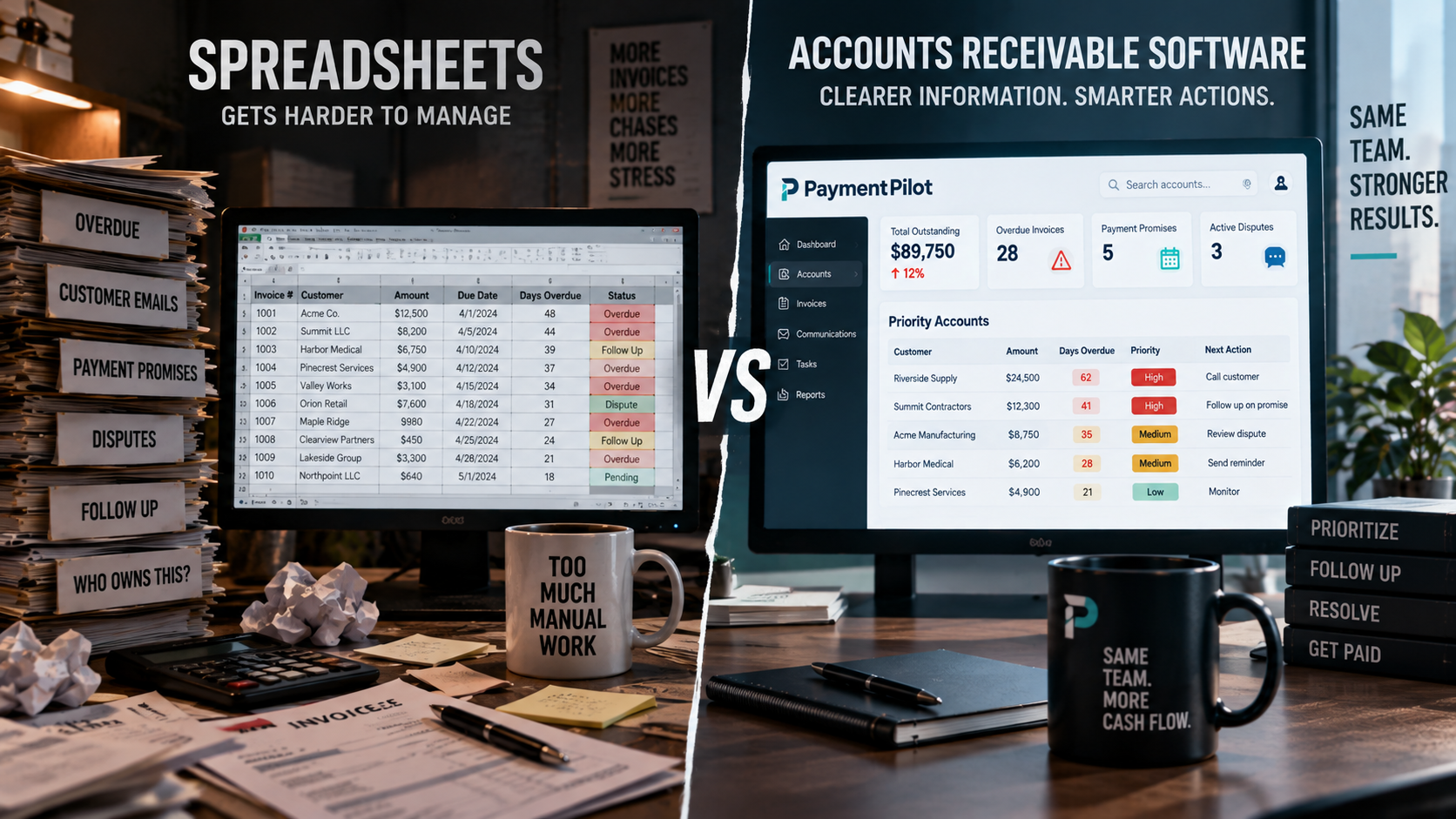
Spreadsheet vs. Accounts Receivable Software: When Is It Time to Upgrade?
Spreadsheets are not the enemy.
For many small businesses, they are the first practical way to track unpaid invoices.
You list the customer.
Add the invoice amount.
Enter the due date.
Maybe add a notes column.
And for a while, it works.
Then the business grows.
More invoices appear.
More customers respond.
More people touch collections.
Promises to pay get buried in inboxes.
Disputes sit in separate email threads.
Someone updates one spreadsheet while another employee is looking at an older version.
And suddenly the spreadsheet is no longer helping you manage accounts receivable.
It is helping you remember that accounts receivable exists.
That is the point where many businesses begin asking whether they need dedicated accounts receivable software.
If you are still building your overall process, start with our guide to small business accounts receivable collections.
When Spreadsheets Work Well for Accounts Receivable
A spreadsheet can be perfectly adequate when your collection process is simple.
For example:
- You have a small number of open invoices
- One person manages collections
- Customer communication is straightforward
- Payment promises are rare
- Disputes are uncommon
- Follow-up volume is manageable
- Everyone knows who owns each account
In this environment, a spreadsheet can give you useful visibility.
You may track:
- Customer
- Invoice number
- Amount
- Invoice date
- Due date
- Days overdue
- Last contact date
- Notes
- Status
There is nothing wrong with that.
The problem is not the spreadsheet itself.
The problem is when the workflow becomes more complex than the spreadsheet can comfortably represent.
The Real Question Is Not “Do We Need Software?”
The better question is:
“Is our current process still giving us the information we need to make good collection decisions?”
If the answer is yes, there may be no urgent reason to change.
If the answer is no, the cost of staying with a manual process may be growing quietly in the background.
That cost can show up as:
- Staff time
- Missed follow-ups
- Duplicate messages
- Forgotten payment promises
- Delayed dispute resolution
- Inconsistent customer communication
- Older receivables
- Slower cash flow
Sign 1: Your Team Keeps Asking “Who Should We Contact First?”
This is one of the clearest warning signs.
A spreadsheet can show which invoices are overdue.
But when dozens of accounts are past due, someone still has to decide where to start.
That decision may depend on:
- Balance
- Days overdue
- Customer importance
- Recent activity
- Broken payment promises
- Disputes
- Previous collection attempts
If your team is repeatedly sorting rows and reading notes to decide what deserves attention, your process may need a real priority workflow.
For more on this, read how to prioritize overdue invoices.
Sign 2: Customer Communication Lives Outside the Spreadsheet
This is where spreadsheets become difficult.
The invoice may be in your accounting system.
The aging report may be in Excel.
The customer’s response may be in Gmail.
A payment promise may be in Outlook.
A dispute may be in a shared mailbox.
An account manager may have their own notes.
Now someone has to reconstruct the entire story before following up.
That creates risk.
You may send a reminder to someone who already replied.
You may contact a customer while another employee is already handling the issue.
You may miss a dispute that completely changes the next action.
A strong collection process needs more than invoice data.
It needs customer context.
Sign 3: Payment Promises Are Easy to Forget
A customer says:
“We will pay next Wednesday.”
Someone adds a note.
Then Wednesday comes.
Nobody remembers.
Friday arrives.
The invoice is still unpaid.
This happens because spreadsheets are usually passive.
They store information.
They do not always help turn that information into a next action.
A better workflow treats a promise to pay as an event.
Record:
- Customer
- Invoice
- Amount
- Promised date
- Contact
- Owner
- Follow-up date
Then when the promised date passes, the account should become actionable again.
If you need a stronger follow-up structure, see our guide to accounts receivable follow-up schedules.
Sign 4: Disputes Are Just Another Notes Column
“Disputed.”
That may be all the spreadsheet says.
But that does not answer:
- Why is it disputed?
- Who owns the issue?
- What documentation is needed?
- When did the customer raise it?
- What is the resolution deadline?
- What happens after it is resolved?
A dispute is not just a collection status.
It is its own workflow.
If unresolved disputes sit inside free-form spreadsheet notes, they can easily become bottlenecks.
Sign 5: Multiple People Are Managing the Same Accounts
As soon as several employees touch collections, coordination becomes harder.
You may run into:
- Duplicate follow-ups
- Conflicting notes
- Unclear ownership
- Old spreadsheet versions
- Missed customer replies
- Different interpretations of account status
Someone may think:
“Accounting is handling that.”
Accounting may think:
“The account manager is handling that.”
Meanwhile, nobody is actually handling it.
Dedicated accounts receivable software can make ownership clearer.
Sign 6: You Are Spending More Time Finding Information Than Taking Action
This is one of the biggest hidden costs.
Imagine that every follow-up requires someone to:
- Open the aging report
- Find the invoice
- Open the customer’s account
- Search email
- Check previous notes
- Look for a payment promise
- Confirm whether a dispute exists
- Decide what to do next
Do that across 30 or 50 accounts and the administrative burden adds up quickly.
At that point, the problem is no longer just collections.
It is workflow friction.
Sign 7: Older Invoices Keep Appearing as “Surprises”
An invoice should not suddenly become 90 days overdue without anyone noticing.
But manual systems often create exactly that problem.
A receivable can sit quietly while employees focus on newer or larger issues.
By the time someone notices, the account is significantly aged.
If you are dealing with heavily aged balances, read what to do with invoices over 90 days overdue.
Sign 8: Your DSO Is Increasing and You Cannot Explain Why
A rising Days Sales Outstanding number may indicate that customers are paying more slowly.
But it can also reflect operational problems such as:
- Late invoicing
- Poor follow-up consistency
- Unresolved disputes
- Weak payment-promise tracking
- Unclear account ownership
- Failure to prioritize higher-risk receivables
If DSO is getting worse and your team cannot quickly explain what is driving it, your collections data may be too fragmented.
See why DSO may be increasing for a deeper look at the causes.
Spreadsheet vs. Accounts Receivable Software
Here is the practical difference.
| Spreadsheet | Accounts Receivable Software |
|---|---|
| Tracks rows of invoice data | Organizes collection workflow |
| Requires manual prioritization | Can help surface priority accounts |
| Notes may be free-form | Activity can be structured |
| Email history lives elsewhere | Customer activity may be centralized |
| Promises are manually tracked | Promises can become workflow events |
| Disputes may be just notes | Disputes can have owners and next actions |
| Ownership can be unclear | Accounts can have assigned responsibility |
| Next action must be decided manually | Software can help recommend next actions |
| Mostly passive | Designed to support ongoing collection activity |
The value of dedicated AR software is not simply that it stores more information.
The value is that it can help turn information into action.
Accounting Software Is Not the Same as Collections Software
This distinction is important.
Your accounting platform may already manage:
- Invoices
- Payments
- General ledger
- Financial reporting
- Reconciliation
Those are core accounting functions.
Collections software focuses on a different question:
What happens between an unpaid invoice and resolution?
That includes:
- Prioritization
- Customer communication
- Promises to pay
- Disputes
- Follow-up
- Ownership
- Next actions
- Escalation
In many businesses, both systems serve different purposes.
What Should Accounts Receivable Software Actually Help You Do?
A useful system should help your team answer:
What needs attention?
Why does it need attention?
What has already happened?
Who owns it?
What should happen next?
That is more useful than simply seeing a longer list of overdue balances.
Why Prioritization Matters More as You Grow
When you only have five overdue invoices, prioritization is simple.
When you have 50, it becomes a daily operational problem.
Not every invoice deserves the same attention.
You may have:
- A large balance with no response
- An older invoice with a valid payment promise
- A disputed invoice awaiting internal review
- A small balance with no meaningful risk
- A strategic customer whose account needs careful handling
Dedicated software can help organize those situations so the team is not treating every invoice the same.
Why Human Control Still Matters
Moving beyond spreadsheets does not mean turning collections over to automation.
Customer relationships still matter.
A software system may identify an account as overdue.
But a person may know:
- The customer is waiting on a corrected invoice
- A dispute is being resolved
- Payment is already scheduled
- The account manager is handling the issue
- The relationship requires special care
That is why human review remains important.
AI and automation should support judgment.
They should not blindly replace it.
Where AI Can Help
AI can be especially useful for:
- Organizing account priorities
- Summarizing customer activity
- Surfacing payment promises
- Highlighting disputes
- Recommending possible next actions
- Helping prepare outreach
That can reduce the amount of manual searching required before an employee can take action.
For more on this model, see our guide to AI accounts receivable software.
Where PaymentPilot Fits
PaymentPilot is designed to help small businesses move beyond fragmented collection workflows.
Instead of relying on separate spreadsheets, inboxes, notes, and memory, PaymentPilot provides a more structured collections environment.
Its workflow is built around:
- Priority accounts
- Customer activity
- Payment promises
- Disputes
- Follow-up history
- Recommended next actions
- Human review
- Email integration
The goal is not to replace your accounting system.
It is to help your team manage what happens after an invoice is unpaid.
Spreadsheet vs. Software: A Simple Decision Test
Ask these questions.
Can everyone see the current status of an overdue account?
If no, your process may be too fragmented.
Can your team tell who owns the next step?
If no, you have an ownership problem.
Can you see promises and disputes without searching inboxes?
If no, context is scattered.
Can your team identify the highest-priority accounts quickly?
If no, prioritization is too manual.
Can you explain why older receivables are not moving?
If no, visibility is weak.
Does follow-up depend on one person’s memory?
If yes, the process may not scale.
Are employees repeatedly switching between spreadsheets, accounting software, and email?
If yes, dedicated workflow software may save significant time.
If several of these answers point to problems, the business may be ready for something beyond a spreadsheet.
You Do Not Need to Wait for a Collections Crisis
Many companies wait until the aging report becomes painful.
That is usually too late.
The best time to improve the workflow is when you first notice:
- More accounts
- More users
- More follow-up
- More disputes
- More payment promises
- More confusion
A process that worked at 20 open invoices may not work at 200.
That does not mean the original process was bad.
It means the business changed.
The Goal Is Not More Software
This is worth emphasizing.
The answer is not:
“Buy more software.”
The answer is:
“Use the simplest system that keeps the workflow clear.”
For some businesses, that will still be a spreadsheet.
For others, dedicated accounts receivable software may significantly improve visibility and consistency.
The right time to upgrade is when your current process starts creating more work than it saves.
From Spreadsheet to Collections Command Center
A spreadsheet tells you what is in the list.
A collection system should help tell you what to do with the list.
Instead of:
Invoice → spreadsheet → inbox → notes → spreadsheet
the goal becomes:
Invoice → context → priority → next action → resolution
That is the shift.
If your team needs help deciding what to work on first, read how to prioritize overdue invoices.
If you need a structured cadence, see our accounts receivable follow-up schedule.
If you want the full process, start with small business accounts receivable collections.
And if spreadsheets, inboxes, and notes are making your collection process harder than it needs to be, explore PaymentPilot.
Less searching. Clearer priorities. Better next actions.
FAQ: Spreadsheet vs. Accounts Receivable Software
Can I manage accounts receivable with a spreadsheet?
Yes. A spreadsheet can work well for a small volume of invoices and a simple collection process, especially when one person manages everything.
When should I stop using spreadsheets for collections?
Consider moving to dedicated software when multiple people manage accounts, customer activity is scattered, promises or disputes are frequently missed, or prioritization has become difficult.
Does accounts receivable software replace accounting software?
Usually not. Accounting software handles bookkeeping and financial records, while accounts receivable collection software focuses on the workflow between an unpaid invoice and resolution.
What are the risks of using spreadsheets for collections?
Potential problems include outdated versions, unclear ownership, duplicate follow-ups, missed payment promises, lost customer context, and difficulty prioritizing overdue accounts.
Can accounts receivable software help prioritize invoices?
Yes. Dedicated AR software can use account data and activity to help teams identify which receivables deserve attention first.
Can AI help with accounts receivable?
AI can assist with prioritization, activity summaries, recommended next actions, and outreach preparation. Human review remains important for customer-facing decisions.
What should I look for in accounts receivable software?
Look for clear account prioritization, customer activity, promise tracking, dispute management, next actions, ownership, email integration, and human approval controls.
What is PaymentPilot?
PaymentPilot is an AI-assisted accounts receivable collections platform designed to help small businesses organize overdue accounts, customer activity, promises, disputes, and next actions while keeping people in control.