
Small Business Accounts Receivable Collections: A Practical Guide
Small Business Accounts Receivable Collections: From Overdue Invoice to Clear Next Action
Getting the sale is only half the transaction.
Until the invoice is paid, part of your revenue is still sitting in accounts receivable.
For many small businesses, the challenge is not knowing that an invoice is overdue. Your accounting system or spreadsheet can usually tell you that.
The harder questions are:
Who should we contact first?
What happened with this customer last time?
Did they already promise to pay?
Is there an unresolved dispute?
Who owns the next step?
What should actually happen today?
That is the difference between simply having an aging report and having a real accounts receivable collection process.
A strong collections workflow gives your team a clear path from overdue invoice to resolution without forcing employees to reconstruct the customer story from spreadsheets, inboxes and memory.
What Is Accounts Receivable Collections?
Accounts receivable collections is the process a business uses to monitor unpaid invoices, communicate with customers, resolve payment obstacles, document activity and move outstanding balances toward payment or another defined resolution.
A good process does more than send reminders.
It creates a repeatable flow:
Monitor → Prioritize → Follow Up → Resolve → Document
The objective is not to pressure every customer.
The objective is to make sure every important receivable has a clear status, owner and next action.
If you are also trying to understand how quickly your company is converting receivables into cash, start with our guide to what a good DSO looks like. DSO is useful for measuring collection performance, but the number makes the most sense when compared with your payment terms, historical performance and receivable mix.
Step 1: Make Sure the Invoice Is Actually Collectible
Before asking a customer for payment, verify the underlying invoice.
Check:
- Customer name
- Billing contact
- Invoice number
- Invoice amount
- Invoice date
- Due date
- Payment terms
- Purchase-order requirements
- Credits or adjustments
- Partial payments
- Supporting documentation
- Payment instructions
A collection process cannot fix an inaccurate invoice.
If the customer is waiting for a corrected bill, a purchase order, supporting documentation or internal approval, repeatedly sending overdue notices may simply create frustration.
This is why improving collections often begins upstream.
Invoice accuracy and billing speed can have a direct impact on collection performance. If your DSO has recently increased, our guide on why DSO may be increasing walks through operational causes such as invoicing delays, follow-up gaps and changes in customer payment behavior.
Step 2: Know What Is Actually Overdue
An accounts receivable aging report generally separates unpaid balances into categories such as:
- Current
- 1–30 days overdue
- 31–60 days overdue
- 61–90 days overdue
- More than 90 days overdue
Aging gives you visibility.
But aging alone does not determine priority.
Imagine two invoices:
Invoice A: $300 and 67 days overdue.
Invoice B: $24,000 and 14 days overdue with no recent customer contact.
Which deserves attention first?
The oldest invoice is not automatically the highest priority.
That is why a strong collections process combines aging data with account context.
Step 3: Prioritize Accounts Instead of Treating Every Invoice the Same
One of the biggest inefficiencies in small business collections is treating the entire aging report like one giant to-do list.
Instead, consider multiple factors when deciding where to focus:
- Amount outstanding
- Days past due
- Previous customer communication
- Broken promises to pay
- Active disputes
- Payment history
- Customer importance
- Recent follow-up activity
- Internal ownership
- Concentration risk
This changes the question from:
“Which invoices are overdue?”
to:
“Which accounts need attention right now?”
That difference matters.
A customer who promised to pay Friday does not need the same action as a customer who has ignored three previous attempts.
A disputed invoice does not need the same treatment as an invoice that simply slipped through the customer’s approval process.
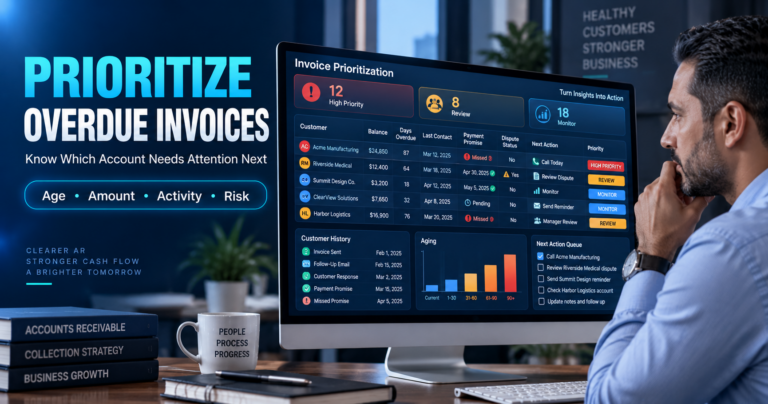
PaymentPilot was built around this idea. Its accounts receivable command center helps small businesses centralize invoice and customer activity, identify priority accounts and review AI-assisted recommended next actions rather than manually working through an endless spreadsheet.
You can learn more about the platform here: PaymentPilot AI accounts receivable software.
Step 4: Give Every Important Account a Clear Next Action
An overdue invoice should not simply have a status that says:
Past Due
It should tell someone what to do.
Examples of useful next actions include:
- Confirm invoice receipt
- Verify the billing contact
- Resend supporting documents
- Send a payment reminder
- Call the customer
- Document a promise to pay
- Follow up on a broken promise
- Investigate an invoice dispute
- Correct a billing error
- Escalate internally
- Review the account for a more formal collection decision
The more specific the next action, the less likely the invoice is to disappear into a spreadsheet.
A practical rule is to make sure every priority account has four things:
Status. Owner. Next action. Due date.
If one of those is missing, the receivable can easily stall.
Step 5: Keep Customer Communication With the Account History
One of the biggest problems with manual collections is fragmentation.
The invoice may be in your accounting system.
The customer’s response may be in Outlook.
A promise to pay may be buried in Gmail.
A dispute may be sitting in an employee’s inbox.
Internal notes may be in a spreadsheet.
Now someone has to reconstruct the entire account story before deciding what to do next.
That creates several risks:
- Duplicate follow-ups
- Messages sent without context
- Missed customer replies
- Forgotten payment promises
- Unclear account ownership
- Delayed dispute resolution
- Inconsistent customer communication
PaymentPilot is designed to bring customer and invoice activity into one collections workflow and supports Gmail and Outlook integration so communication can be managed alongside receivable information.
The goal is simple:
Before anyone contacts a customer, they should be able to understand what has already happened.
Step 6: Track Promises to Pay
A customer saying:
“We’ll pay next Friday.”
is useful information.
But only if someone records it.
A payment promise should include:
- Customer name
- Invoice
- Promised amount
- Promised payment date
- Person making the commitment
- Employee who recorded it
- Follow-up date
When Friday arrives, the account should automatically become actionable again if the payment has not been received.
This is much stronger than relying on someone’s inbox or memory.
Broken payment promises can also be an important operational signal when evaluating collection performance.
Step 7: Separate Collection Problems From Dispute Problems
Not every overdue invoice is overdue because the customer refuses to pay.
Some are delayed because of:
- Incorrect pricing
- Missing documentation
- Service complaints
- Purchase-order issues
- Duplicate invoices
- Delivery disputes
- Contract questions
- Credits that have not been processed
Sending another payment reminder will not resolve those problems.
The next action should address the obstacle.
That is why effective accounts receivable management needs more than a “sent reminder” column.
It needs context.
Step 8: Create a Follow-Up Rhythm
Consistency matters.
A small business should have a general follow-up process for invoices as they age.
That does not mean every account receives the exact same automated message.
A basic framework might include:
Before the due date
For important invoices, confirm that the invoice was received and that the customer has everything needed to process it.
1–30 days overdue
Confirm receipt, identify payment obstacles and establish the next step.
31–60 days overdue
Review previous communication, payment promises, disputes and account ownership.
61–90 days overdue
Increase management visibility and make sure there is a defined resolution strategy.
90+ days overdue
Do not simply keep repeating the same reminder.
A severely aged invoice should have a verified balance, documentation, a responsible owner, a defined next action, a deadline and an escalation decision.
Our guide on what to do with invoices over 90 days overdue goes deeper into that stage of the collection process.
Step 9: Do Not Automate Customer Relationships Blindly
AI and automation can reduce repetitive collection work.
But customer communication requires context.
Imagine an automated system sending:
“Your invoice remains unpaid.”
The problem?
The customer emailed yesterday explaining that the invoice contains an error.
Or they already sent proof of payment.
Or your employee promised to investigate a dispute.
Automation without context can make your company appear more disorganized, not less.
A better model is:
AI analyzes.
AI recommends.
Human reviews.
Human approves.
PaymentPilot is specifically designed around AI assistance with human oversight. The platform can help identify account priorities and recommend possible next actions while keeping important customer-facing communication visible for review.
That matters because collections affects more than cash flow.
It also affects customer relationships.
Step 10: Measure More Than DSO
Days Sales Outstanding is useful, but it should not be the only collection metric you monitor.
Consider tracking:
- Total accounts receivable
- Total overdue balance
- Percentage of receivables overdue
- Percentage more than 60 days overdue
- Percentage more than 90 days overdue
- Number of open disputes
- Average dispute-resolution time
- Payment promises
- Broken payment promises
- Follow-ups completed
- Accounts without a next action
- Customer complaints related to collections
If your goal is to improve collection performance without creating unnecessary friction with customers, see our guide on how to reduce DSO without damaging client relationships. It emphasizes timely invoicing, consistent follow-up, dispute resolution, payment-promise tracking and prioritizing aged or high-value balances.
Step 11: Move From an Aging Report to an Action Queue
An aging report tells you how old receivables are.
An action queue tells your team what to do.
That is a major operational difference.
Instead of opening a spreadsheet and asking:
“Where do I start?”
your team should be able to see:
- Priority account
- Outstanding balance
- Aging
- Recent activity
- Current status
- Recommended next action
- Responsible owner
That is closer to how PaymentPilot approaches collections.
The platform turns scattered invoices, customer activity and follow-up work into a prioritized collections workflow, with AI-assisted recommendations and human approval built into the process.
Spreadsheet vs. Accounts Receivable Collection Software
A spreadsheet can be perfectly adequate when:
- You have very few open invoices
- One person manages collections
- Customer communication is simple
- Payment promises and disputes are rare
- Your team can easily maintain account history manually
The problem begins when information becomes fragmented.
Signs that your process may be outgrowing spreadsheets include:
- Multiple people asking who should be contacted next
- Customer communication spread across different inboxes
- Forgotten promises to pay
- Duplicate follow-ups
- Difficulty tracking disputes
- Employees spending more time finding information than taking action
- Important invoices aging without a clear owner
Dedicated accounts receivable software does not eliminate judgment.
Its value is helping your team make that judgment with better information.
What Does PaymentPilot Do?
PaymentPilot is an AI-assisted accounts receivable collections platform built for small businesses and service teams.
Its current workflow includes:
- Centralized customer and invoice records
- AI-assisted account prioritization
- Recommended next collection actions
- Customer activity tracking
- Gmail and Outlook integration
- Human approval and oversight
- Collection history and workflow management
It is designed to support collections rather than replace the bookkeeping, financial reporting or tax functions of your accounting system.
PaymentPilot is positioned for businesses including professional services firms, contractors, agencies, consultants, healthcare businesses, B2B companies and other growing service businesses dealing with unpaid invoices.
The Goal Is Not More Collection Activity
This is important.
The goal is not:
Send more emails.
The goal is:
Make better collection decisions.
That means knowing:
- What needs attention
- Why it needs attention
- What has already happened
- Who owns it
- What should happen next
When those answers are clear, collections becomes a process instead of a recurring emergency.
Build a Better Accounts Receivable Collection Process
A practical small business collections workflow looks like this:
1. Verify the invoice
Make sure the balance, contact and documentation are correct.
2. Monitor aging
Know which accounts are moving into higher-risk aging categories.
3. Prioritize
Focus on accounts based on more than age alone.
4. Review context
Understand customer replies, promises and disputes before acting.
5. Assign the next action
Every important account needs an owner and deadline.
6. Follow up consistently
Use a structured process without blindly treating every customer the same.
7. Document the outcome
Preserve the collection history so the next decision starts with context.
8. Measure the process
Monitor aging, overdue balances, promises, disputes and follow-up completion.
That is how you move from simply knowing an invoice is late to knowing what should happen next.
Stop Wondering Which Invoice to Chase Next
Your aging report tells you what is late.
Your collection workflow should tell you what deserves attention next.
PaymentPilot helps small businesses organize receivables, identify priority accounts, review AI-assisted recommendations and manage collection follow-up while keeping people in control of customer-facing decisions.
Explore PaymentPilot and start your 14-day free trial →
The current PaymentPilot offer includes a 14-day free trial with no credit card required, followed by $99/month based on the pricing currently displayed on the site.
FAQ: Small Business Accounts Receivable Collections
What is an accounts receivable collection process?
An accounts receivable collection process is the workflow used to monitor unpaid invoices, prioritize accounts, communicate with customers, document activity and move outstanding balances toward resolution.
How should a small business prioritize overdue invoices?
Consider more than age alone. Useful factors include outstanding balance, days overdue, customer activity, broken payment promises, disputes, payment history and recent follow-up.
What should happen when an invoice reaches 90 days overdue?
A 90-plus-day invoice should have a verified balance, complete documentation, responsible owner, defined next action, deadline and escalation decision. Simply sending more generic reminders is usually not enough.
Can AI help with accounts receivable collections?
AI can assist with analyzing activity, identifying priority accounts and recommending potential next actions. For customer-facing collection activity, human review remains important. PaymentPilot is designed around that human-in-the-loop model.
Does PaymentPilot replace accounting software?
No. PaymentPilot is designed to support the accounts receivable collection workflow. It does not replace bookkeeping, financial reporting or tax functions.
Does PaymentPilot integrate with email?
Yes. PaymentPilot supports Gmail and Outlook integration so collection communication can be managed alongside customer and invoice activity.